


Page 431 - Windows 10 May 2019 Update The Missing Manual: The Book That Should Have Been in the Box
P. 431
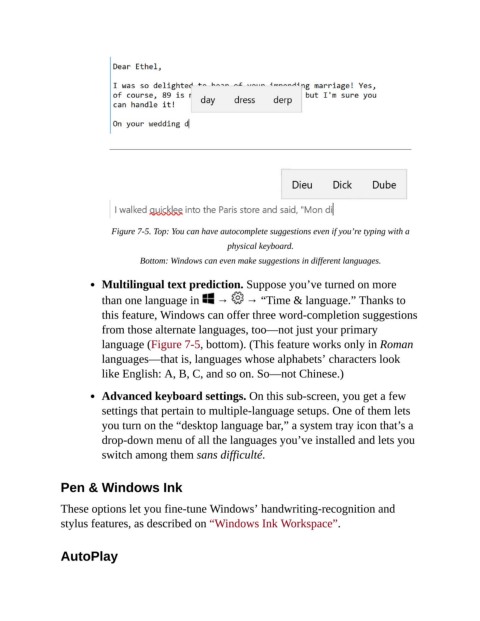
Figure 7-5. Top: You can have autocomplete suggestions even if you’re typing with a
                                                           physical keyboard.

                                     Bottom: Windows can even make suggestions in different languages.

                           Multilingual text prediction. Suppose you’ve turned on more

                           than one language in   →   → “Time & language.” Thanks to
                           this feature, Windows can offer three word-completion suggestions

                           from those alternate languages, too—not just your primary
                           language (Figure 7-5, bottom). (This feature works only in Roman
                           languages—that is, languages whose alphabets’ characters look
                           like English: A, B, C, and so on. So—not Chinese.)


                           Advanced keyboard settings. On this sub-screen, you get a few
                           settings that pertain to multiple-language setups. One of them lets

                           you turn on the “desktop language bar,” a system tray icon that’s a
                           drop-down menu of all the languages you’ve installed and lets you

                           switch among them sans difficulté.


                Pen & Windows Ink


                These options let you fine-tune Windows’ handwriting-recognition and
                stylus features, as described on “Windows Ink Workspace”.


                AutoPlay

