


Page 622 - Windows 10 May 2019 Update The Missing Manual: The Book That Should Have Been in the Box
P. 622
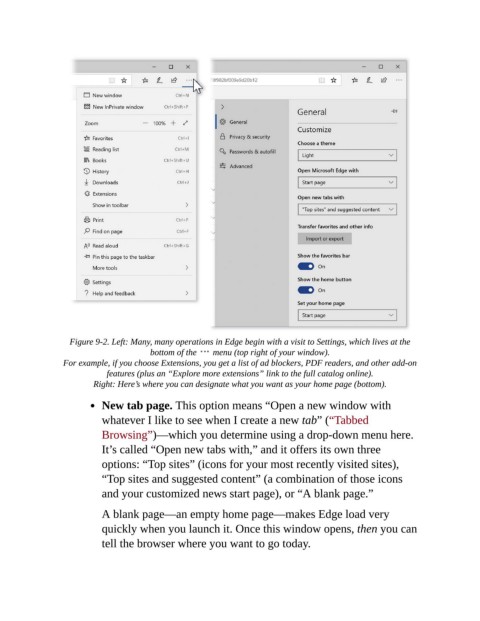
Figure 9-2. Left: Many, many operations in Edge begin with a visit to Settings, which lives at the
                                       bottom of the    menu (top right of your window).

                 For example, if you choose Extensions, you get a list of ad blockers, PDF readers, and other add-on
                            features (plus an “Explore more extensions” link to the full catalog online).

                         Right: Here’s where you can designate what you want as your home page (bottom).

                           New tab page. This option means “Open a new window with
                           whatever I like to see when I create a new tab” (“Tabbed
                           Browsing”)—which you determine using a drop-down menu here.

                           It’s called “Open new tabs with,” and it offers its own three
                           options: “Top sites” (icons for your most recently visited sites),
                           “Top sites and suggested content” (a combination of those icons

                           and your customized news start page), or “A blank page.”

                           A blank page—an empty home page—makes Edge load very
                           quickly when you launch it. Once this window opens, then you can

                           tell the browser where you want to go today.

