


Page 70 - Windows 10 May 2019 Update The Missing Manual: The Book That Should Have Been in the Box
P. 70
If you really want to do the sleeping or shutting down thing using the

                onscreen commands, click the   at the bottom of the places column of the
                Start menu.

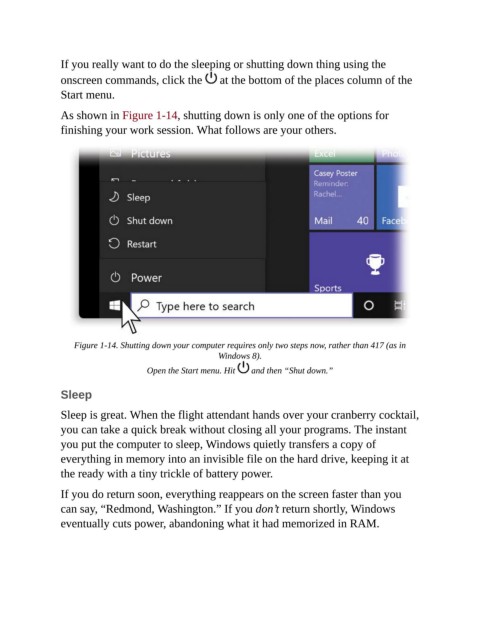
                As shown in Figure 1-14, shutting down is only one of the options for

                finishing your work session. What follows are your others.


                    Figure 1-14. Shutting down your computer requires only two steps now, rather than 417 (as in
                                                         Windows 8).

                                      Open the Start menu. Hit    and then “Shut down.”


                Sleep

                Sleep is great. When the flight attendant hands over your cranberry cocktail,
                you can take a quick break without closing all your programs. The instant

                you put the computer to sleep, Windows quietly transfers a copy of
                everything in memory into an invisible file on the hard drive, keeping it at
                the ready with a tiny trickle of battery power.


                If you do return soon, everything reappears on the screen faster than you
                can say, “Redmond, Washington.” If you don’t return shortly, Windows
                eventually cuts power, abandoning what it had memorized in RAM.

