


Page 570 - Ultimate Visual Dictionary (DK)
P. 570
THE MODERN WORLD
       Handheld computer                                                                Sleep/wake button


       BY THE EARLY 1990s electronic circuitry had
       been miniaturized to such an extent that it was
       possible to make small handheld computing devices.
       The first of these was the Personal Digital Assistant
       (PDA), which offered features including an address
       book, calendar, and notepad. In recent years, PDAs
       have been overtaken by smartphones with internet and
       email access (see pp. 588–589). A related product is the
       e-book reader, which stores books in digital form and
       uses “electronic paper” to mimic the appearance of ink
       on real paper. An e-book reader no bigger than a thin
       paperback can store several thousand digital books in
       its memory. The most recent small computing device is
       the handheld computer. This looks like a thin flat
       display, but it is actually a complete computer.
       Handheld computers are typically controlled by a
       touch-sensitive screen and have a wireless link to other
       computers and the internet. They run software
       applications, or apps, downloaded from the internet.
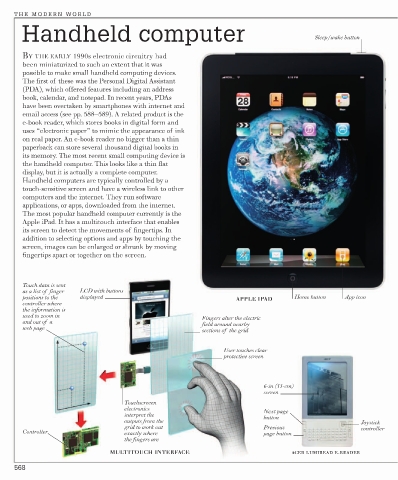
       The most popular handheld computer currently is the
       Apple iPad. It has a multitouch interface that enables
       its screen to detect the movements of fingertips. In
       addition to selecting options and apps by touching the
       screen, images can be enlarged or shrunk by moving
       fingertips apart or together on the screen.


       Touch data is sent
       as a list of  finger   LCD with buttons
       positions to the   displayed                                APPLE IPAD      Home button   App icon
       controller where
       the information is
       used to zoom in                                   Fingers alter the electric
       and out of  a                                     field around nearby
       web page
                                                         sections of  the grid
                                                               User touches clear
                                                               protective screen


                                                                          6-in (15-cm)
                                                                          screen
                                    Touchscreeen
                                    electronics                           Next page
                                    interpret the                         button
                                    outputs from the                                                 Joystick
                                    grid to work out                      Previous                   controller
       Controller                   exactly where                         page button
                                    the fingers are
                                MULTITOUCH INTERFACE                              ACER LUMIREAD E-READER

     568

