


Page 9 - (DK Eyewitness) Travel Guide - 15-minute Italian
P. 9
H OW TO U SE TH E AU D I O A PP  7 7 7

       How to use the audio app

       All the numbered exercises in each   your 15-minute lessons using the book
       lesson, apart from the Warm-ups at   only, and then go back and work with
       the beginning and the Say it exercises   the audio and the book together,
       at the end, have recorded audio, available   repeating the text in the gaps provided
       via a free app. The app also includes a   and then recording yourself. Or you can
       function to record yourself and listen   combine the book and the audio right
       to yourself alongside native speakers.  from the beginning, pausing the app to
        To start using the audio with the   read the instructions on the page as you
       book, first download the DK 15 Minute   need to. Try to say the words aloud, and
       Language Course app on your smart–  practice enunciating properly. Detailed
       phone or tablet from the App Store or   instructions on how to use the app are
       Google Play. Open the app and scan the   available from the menu bar in the app.
       QR code on the back of this book to add   Remember that repetition is vital
       it to your Library. As soon as the QR code   to language learning. The more
       is recognized, the audio will download.   often you listen to a conversation or
        There are two ways in which you can   repeat an oral exercise, the more the
       use the audio. The first is to read through   language will sink in.
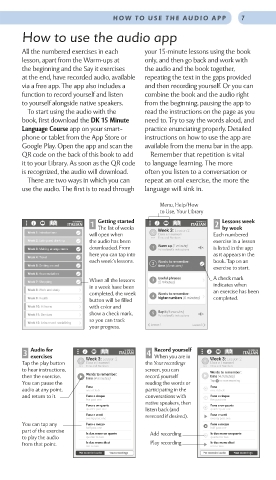
                                          Menu, Help/How
                                          to Use, Your Library
                  ITALIAN 1  Getting started      ITALIAN  2  Lessons week
                          The list of weeks               by week
                        will open when    L’ora e i numeri  Each numbered
                                          Time and Numbers
                        the audio has been              exercise in a lesson
                        downloaded. From                is listed in the app
                        here you can tap into           as it appears in the
                        each week’s lessons.            book. Tap on an
                                                        exercise to start.
                        When all the lessons            A check mark
                        in a week have been             indicates when
                        completed, the week             an exercise has been
                        button will be filled           completed.
                        with color and
                        show a check mark,
                        so you can track
                        your progress.


       3  Audio for             ITALIAN  4  Record yourself    ITALIAN
         exercises
                                         When you are in
       Tap the play button   L’ora e i numeri  the Your recordings  L’ora e i numeri
                                                       Time and Numbers
                       Time and Numbers
       to hear instructions,          screen, you can
       then the exercise.             record yourself
       You can pause the              reading the words or
       audio at any point,   l’una    participating in the   l’una
                       one o’clock
                                                       one o’clock
       and return to it.  l’una e cinque  conversations with   l’una e cinque
                       five past one                   five past one
                       l’una e un quarto  native speakers, then   l’una e un quarto
                       quarter past one  listen back (and   quarter past one
                       l’una e venti  rerecord if desired).  l’una e venti
                       twenty past one                 twenty past one
       You can tap any   l’una e mezzo                 l’una e mezzo
       part of the exercise   half past one  Add recording  half past one
                       le due meno un quarto
                                                       le due meno un quarto
       to play the audio   quarter to two              quarter to two
       from that point.  le due meno dieci  Play recording  le due meno dieci
                       ten to two
                                                       ten to two

