


Page 25 - Computing Book 7
P. 25
Data Handling                                                                        Class 7


               Filters:

               To add a filter:
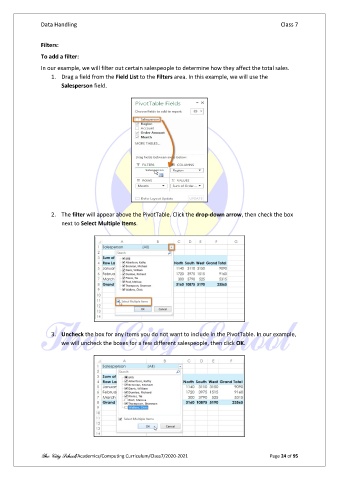
               In our example, we will filter out certain salespeople to determine how they affect the total sales.
                   1.  Drag a field from the Field List to the Filters area. In this example, we will use the
                       Salesperson field.


                   2.  The filter will appear above the PivotTable. Click the drop-down arrow, then check the box
                       next to Select Multiple Items.


                   3.  Uncheck the box for any items you do not want to include in the PivotTable. In our example,
                       we will uncheck the boxes for a few different salespeople, then click OK.


               The City School/Academics/Computing Curriculum/Class7/2020-2021                  Page 24 of 95

