


Page 63 - Computing Book 7
P. 63
Programming the Computer (Python)                                                    Class 7


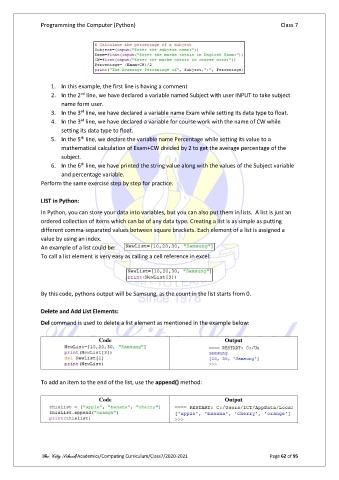
                   1.  In this example, the first line is having a comment
                             nd
                   2.  In the 2  line, we have declared a variable named Subject with user INPUT to take subject
                       name form user.
                             rd
                   3.  In the 3  line, we have declared a variable name Exam while setting its data type to float.
                             rd
                   4.  In the 3  line, we have declared a variable for course work with the name of CW while
                       setting its data type to float.
                             th
                   5.  In the 5  line, we declare the variable name Percentage while setting its value to a
                       mathematical calculation of Exam+CW divided by 2 to get the average percentage of the
                       subject.
                             th
                   6.  In the 6  line, we have printed the string value along with the values of the Subject variable
                       and percentage variable.
               Perform the same exercise step by step for practice.

               LIST in Python:

               In Python, you can store your data into variables, but you can also put them in lists.  A list is just an
               ordered collection of items which can be of any data type. Creating a list is as simple as putting
               different comma-separated values between square brackets. Each element of a list is assigned a
               value by using an index.
               An example of a list could be:
               To call a list element is very easy as calling a cell reference in excel:


               By this code, pythons output will be Samsung, as the count in the list starts from 0.

               Delete and Add List Elements:
               Del command is used to delete a list element as mentioned in the example below:

                                    Code                                        Output


               To add an item to the end of the list, use the append() method:

                                    Code                                        Output


               The City School/Academics/Computing Curriculum/Class7/2020-2021                  Page 62 of 95

