


Page 66 - Computing Book 7
P. 66
Programming the Computer (Python)                                                    Class 7


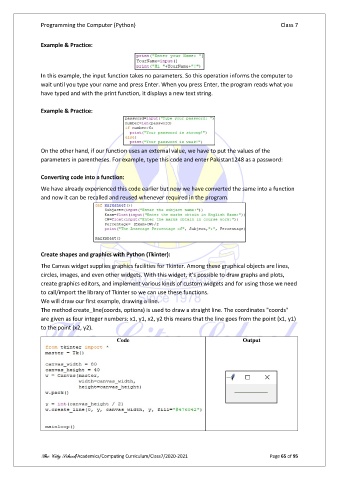
               Example & Practice:


               In this example, the input function takes no parameters. So this operation informs the computer to
               wait until you type your name and press Enter. When you press Enter, the program reads what you
               have typed and with the print function, it displays a new text string.

               Example & Practice:


               On the other hand, if our function uses an external value, we have to put the values of the
               parameters in parentheses. For example, type this code and enter Pakistan1248 as a password:

               Converting code into a function:

               We have already experienced this code earlier but now we have converted the same into a function
               and now it can be recalled and reused whenever required in the program.


               Create shapes and graphics with Python (Tkinter):

               The Canvas widget supplies graphics facilities for Tkinter. Among these graphical objects are lines,
               circles, images, and even other widgets. With this widget, it's possible to draw graphs and plots,
               create graphics editors, and implement various kinds of custom widgets and for using those we need
               to call/import the library of Tkinter so we can use these functions.
               We will draw our first example, drawing a line.
               The method create_line(coords, options) is used to draw a straight line. The coordinates "coords"
               are given as four integer numbers: x1, y1, x2, y2 this means that the line goes from the point (x1, y1)
               to the point (x2, y2).

                                          Code                                        Output


               The City School/Academics/Computing Curriculum/Class7/2020-2021                  Page 65 of 95

