


Page 64 - Computing Book 7
P. 64
Programming the Computer (Python)                                                    Class 7


               Python Conditions and If Statements

               These conditions can be used in several ways, most commonly in "if statements" and loops.
               IF
               An "if statement" is written by using the if keyword.
                                    Code                                        Output


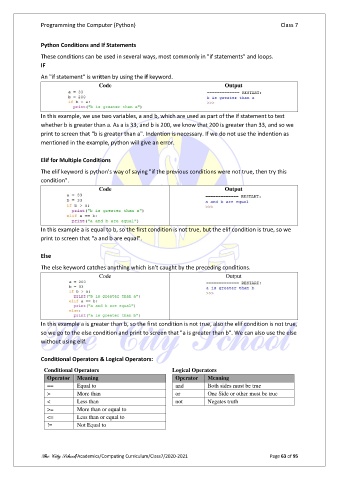
               In this example, we use two variables, a and b, which are used as part of the if statement to test
               whether b is greater than a. As a is 33, and b is 200, we know that 200 is greater than 33, and so we
               print to screen that "b is greater than a". Indention is necessary. If we do not use the indention as
               mentioned in the example, python will give an error.

               Elif for Multiple Conditions

               The elif keyword is python’s way of saying "if the previous conditions were not true, then try this
               condition".
                                    Code                                        Output


               In this example a is equal to b, so the first condition is not true, but the elif condition is true, so we
               print to screen that "a and b are equal".

               Else
               The else keyword catches anything which isn't caught by the preceding conditions.
                                    Code                                        Output


               In this example a is greater than b, so the first condition is not true, also the elif condition is not true,
               so we go to the else condition and print to screen that "a is greater than b". We can also use the else
               without using elif.

               Conditional Operators & Logical Operators:
                Conditional Operators                         Logical Operators
                  Operator   Meaning                           Operator   Meaning
                  ==        Equal to                           and        Both sides must be true
                  >         More than                          or         One Side or other must be true
                  <         Less than                          not        Negates truth

                  >=        More than or equal to
                  <=        Less than or equal to
                  !=        Not Equal to


               The City School/Academics/Computing Curriculum/Class7/2020-2021                  Page 63 of 95

