


Page 82 - Computing Book 7
P. 82
Robotics – Edison                                                                    Class 7


               Right and left obstacle detection:

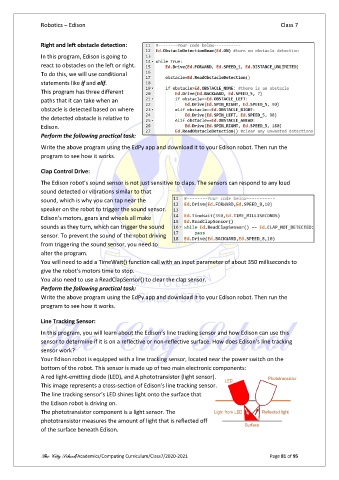
               In this program, Edison is going to
               react to obstacles on the left or right.
               To do this, we will use conditional
               statements like if and elif.
               This program has three different
               paths that it can take when an
               obstacle is detected based on where
               the detected obstacle is relative to
               Edison.
               Perform the following practical task:

               Write the above program using the EdPy app and download it to your Edison robot. Then run the
               program to see how it works.

               Clap Control Drive:

               The Edison robot’s sound sensor is not just sensitive to claps. The sensors can respond to any loud
               sound detected or vibrations similar to that
               sound, which is why you can tap near the
               speaker on the robot to trigger the sound sensor.
               Edison’s motors, gears and wheels all make
               sounds as they turn, which can trigger the sound
               sensor. To prevent the sound of the robot driving
               from triggering the sound sensor, you need to
               alter the program.
               You will need to add a TimeWait() function call with an input parameter of about 350 milliseconds to
               give the robot’s motors time to stop.
               You also need to use a ReadClapSensor() to clear the clap sensor.
               Perform the following practical task:
               Write the above program using the EdPy app and download it to your Edison robot. Then run the
               program to see how it works.

               Line Tracking Sensor:
               In this program, you will learn about the Edison’s line tracking sensor and how Edison can use this
               sensor to determine if it is on a reflective or non-reflective surface. How does Edison’s line tracking
               sensor work?
               Your Edison robot is equipped with a line tracking sensor, located near the power switch on the
               bottom of the robot. This sensor is made up of two main electronic components:
               A red light-emitting diode (LED), and A phototransistor (light sensor).
               This image represents a cross-section of Edison’s line tracking sensor.
               The line tracking sensor’s LED shines light onto the surface that
               the Edison robot is driving on.
               The phototransistor component is a light sensor. The
               phototransistor measures the amount of light that is reflected off
               of the surface beneath Edison.


               The City School/Academics/Computing Curriculum/Class7/2020-2021                  Page 81 of 95

