


Page 6 - Metroid Mag - November 2016_Neat2
P. 6
6           METROID MAG


        UTILISING THE


        FULL POTENTIAL OF


        HMI TOUCHSCREENS


        There's an increasing trend among packaged equipment manufacturers to include
        a HMI touch screen as part of the electrical control system. Touch screens are intu-
        itive to use and look great, and can be set up with some very intelligent and useful
        features. Let's take a look at what can be done with a HMI.


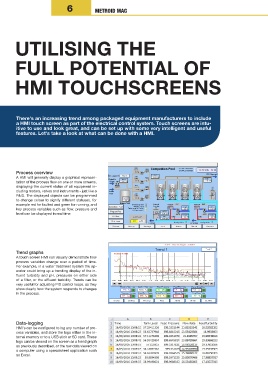
        Process overview
        A HMI will generally display a graphical represen-
        tation of the process flow on one or more screens,
        displaying the current status of all equipment in-
        cluding motors, valves and instruments - just like a
        P&ID. The displayed objects can be programmed
        to change colour to signify different statuses, for
        example red for faulted and green for running, and
        key process variables such as flow, pressure and
        level can be displayed in real time.


        Trend graphs
        A touch screen HMI can visually demonstrate how
        process variables change over a period of time.
        For example, in a water treatment system the op-
        erator could bring up a trending display of the in-
        fluent turbidity  and pH, pressures on either  side
        of a filter, or the effluent turbidity. Trends can be
        very useful for adjusting PID control loops, as they
        show clearly how the system responds to changes
        in the process.


        Data-logging
        HMI's can be configured to log any number of pro-
        cess variables, and store the logs either in the in-
        ternal memory or to a USB stick or SD card. These
        logs can be viewed on the screen as a trend graph
        as previously described, or the raw data viewed on
        a computer using a spreadsheet application such
        as Excel.

