


Page 23 - Refman_Brochures
P. 23
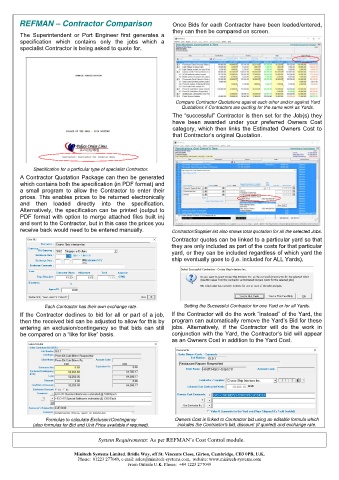
REFMAN – Contractor Comparison                        Once Bids for each Contractor have been loaded/entered,
                                                              they can then be compared on screen.
        The  Superintendent  or  Port  Engineer  first  generates  a
        specification  which  contains  only  the  jobs  which  a
        specialist Contractor is being asked to quote for.


                                                               Compare Contractor Quotations against each other and/or against Yard
                                                                 Quotations if Contractors are quoting for the same work as Yards.
                                                              The “successful” Contractor is then set for the Job(s) they
                                                              have  been  awarded  under  your  preferred  Owners  Cost
                                                              category,  which  then  links  the  Estimated  Owners  Cost  to
                                                              that Contractor’s original Quotation.


             Specification for a particular type of specialist Contractor.
        A Contractor Quotation Package can then be generated
        which contains both the specification (in PDF format) and
        a  small  program  to  allow  the  Contractor  to  enter  their
        prices. This enables prices to be returned electronically
        and  then  loaded  directly  into  the  specification.
        Alternatively, the specification can be printed (output to
        PDF format with option to merge attached files built in)
        and sent to the Contractor, but in this case the prices you
        receive back would need to be entered manually.      Contractor/Supplier list also shows total quotation for all the selected Jobs.

                                                             Contractor quotes can be linked to a particular yard so that
                                                             they are only included as part of the costs for that particular
                                                             yard, or they can be included regardless of which yard the
                                                             ship eventually goes to (i.e. included for ALL Yards).


                 Each Contractor has their own exchange rate.     Setting the Successful Contractor for one Yard or for all Yards.
        If the Contractor declines to bid for all or part of a job,   If the Contractor will do the work “instead” of the Yard, the
        then the received bid can be adjusted to allow for this by  program can automatically remove the Yard’s Bid for these
        entering  an  exclusion/contingency  so  that  bids  can  still   jobs.  Alternatively,  if  the  Contractor  will  do  the  work  in
        be compared on a “like for like” basis.              conjunction with the Yard, the Contractor’s bid will appear
                                                             as an Owners Cost in addition to the Yard Cost.


                 Formulas to calculate Exclusion/Contingency    Owners Cost is linked to Contractor bid using an editable formula which
            (also formulas for Bid and Unit Price available if required).   includes the Contractor’s bid, discount (if quoted) and exchange rate.


                                    System Requirements: As per REFMAN’s Cost Control module.


                           Minitech Systems Limited. Bridle Way, off St. Vincents Close, Girton, Cambridge, CB3 0PB, U.K.
                            Phone:  01223 277049, e-mail: sales@minitech-systems.com,  website: www.minitech-systems.com
                                              From Outside U.K. Phone:  +44 1223 277049

