


Page 19 - Refman_Brochures
P. 19
REFMAN - Time Management Module … ideal companion to REFMAN’s
Specification Generator
Provides the Superintendent or Port Engineer with
facilities to schedule and monitor the progress of all jobs & Cost Control Modules.
in a REFMAN specification. For each job it is possible to
record start date & duration and optionally, specify which If an earlier job is re-scheduled and this affects other
jobs must be completed before the next job can start, later jobs (i.e. “linked” jobs) then the later jobs will be re-
which jobs must at least have started before the next job scheduled automatically. If a later job is re-scheduled
can start and which jobs must be finished before the which is affected by a link to an earlier job, the user will
next job can be completed. be prompted whether or not to remove the link.
Features
Complete monitoring of the progress of jobs without the
need to learn complicated project management
software.
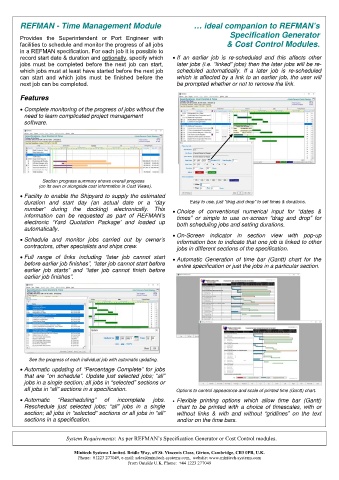
Section progress summary shows overall progress
(on its own or alongside cost information in Cost Views).
Facility to enable the Shipyard to supply the estimated
duration and start day (an actual date or a “day Easy to use, just “drag and drop” to set times & durations.
number” during the docking) electronically. This Choice of conventional numerical input for “dates &
information can be requested as part of REFMAN’s times” or simple to use on-screen “drag and drop” for
electronic ‘Yard Quotation Package’ and loaded up both scheduling jobs and setting durations.
automatically.
On-Screen indicator in section view with pop-up
Schedule and monitor jobs carried out by owner’s information box to indicate that one job is linked to other
contractors, other specialists and ships crew. jobs in different sections of the specification.
Full range of links including “later job cannot start Automatic Generation of time bar (Gantt) chart for the
before earlier job finishes”, “later job cannot start before entire specification or just the jobs in a particular section.
earlier job starts” and “later job cannot finish before
earlier job finishes”.
See the progress of each individual job with automatic updating.
Automatic updating of “Percentage Complete” for jobs
that are “on schedule”. Update just selected jobs; “all”
jobs in a single section; all jobs in “selected” sections or
all jobs in “all” sections in a specification. Options to control appearance and scale of printed time (Gantt) chart.
Automatic “Rescheduling” of incomplete jobs. Flexible printing options which allow time bar (Gantt)
Reschedule just selected jobs; “all” jobs in a single chart to be printed with a choice of timescales, with or
section; all jobs in “selected” sections or all jobs in “all” without links & with and without “gridlines” on the text
sections in a specification. and/or on the time bars.
System Requirements: As per REFMAN’s Specification Generator or Cost Control modules.
Minitech Systems Limited. Bridle Way, off St. Vincents Close, Girton, Cambridge, CB3 0PB, U.K.
Phone: 01223 277049, e-mail: sales@minitech-systems.com, website: www.minitech-systems.com
From Outside U.K. Phone: +44 1223 277049

