


Page 4 - Refman_Brochures
P. 4
S Sp pe ec ci if fi ic ca at ti io on n
                                                                                                G Ge en ne er ra at to or r
        R RE EF FM MA AN Nfor windows

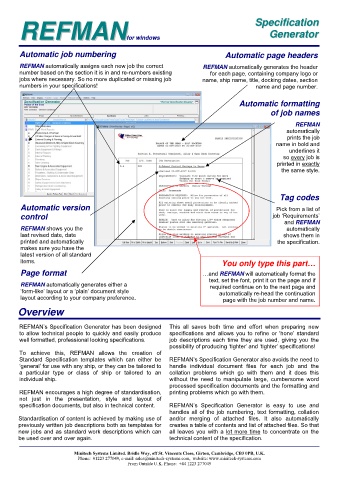
        Automatic job numbering                                                 Automatic page headers


        REFMAN automatically assigns each new job the correct           REFMAN automatically generates the header

        number based on the section it is in and re-numbers existing       for each page, containing company logo or

        jobs where necessary. So no more duplicated or missing job      name, ship name, title, docking dates, section

        numbers in your specifications!                                                    name and page number.


                                                                                     Automatic formatting
                                                                                                of job names

                                                                                                         REFMAN
                                                                                                      automatically
                                                                                                      prints the job
                                                                                                  name in bold and
                                                                                                      underlines it
                                                                                                    so every job is
                                                                                                  printed in exactly
                                                                                                    the same style.


                                                                                                   Tag codes

        Automatic version                                                                         Pick from a list of
        control                                                                                  job ‘Requirements’
                                                                                                     and REFMAN
        REFMAN shows you the                                                                          automatically
        last revised date, date                                                                      shows them in
        printed and automatically                                                                 the specification.
        makes sure you have the
        latest version of all standard
        items.                                                                 You only type this part…

        Page format                                                     …and REFMAN will automatically format the
                                                                          text, set the font, print it on the page and if
        REFMAN automatically generates either a                            required continue on to the next page and
        ‘form-like’ layout or a ‘plain’ document style                        automatically re-head the continuation
        layout according to your company preference.                           page with the job number and name.
        Overview


        REFMAN’s Specification Generator has been designed   This  all  saves  both  time  and  effort  when  preparing  new
        to allow technical people to quickly and easily produce   specifications and allows you to refine or ‘hone’ standard
        well formatted, professional looking specifications.    job  descriptions  each  time  they  are  used,  giving  you  the
                                                             possibility of producing ‘tighter’ and ‘tighter’ specifications!
        To  achieve  this,  REFMAN  allows  the  creation  of
        Standard  Specification  templates  which  can  either  be   REFMAN’s Specification Generator also avoids the need to
        ‘general’ for use with any ship, or they can be tailored to   handle  individual  document  files  for  each  job  and  the
        a  particular  type  or  class  of  ship  or  tailored  to  an   collation  problems  which  go  with  them  and  it  does  this
        individual ship.                                     without  the  need  to  manipulate  large,  cumbersome  word
                                                             processed specification documents and the formatting and
        REFMAN encourages a high degree of standardisation,   printing problems which go with them.
        not  just  in  the  presentation,  style  and  layout  of
        specification documents, but also in technical content.    REFMAN’s  Specification  Generator  is  easy  to  use  and
                                                             handles all of the job numbering, text formatting, collation
        Standardisation of content is achieved by making use of   and/or  merging  of  attached  files.  It  also  automatically
        previously written job descriptions both as templates for   creates a table of contents and list of attached files. So that
        new jobs and as standard work descriptions which can   all leaves you with a lot more time to concentrate on the
        be used over and over again.                         technical content of the specification.


                           Minitech Systems Limited. Bridle Way, off St. Vincents Close, Girton, Cambridge, CB3 0PB, U.K.
                            Phone:  01223 277049, e-mail: sales@minitech-systems.com,  website: www.minitech-systems.com
                                              From Outside U.K. Phone:  +44 1223 277049

