


Page 231 - SK Year 5 Mathematics DLP
P. 231
MY DESIGN


                   Tools/Materials      MS Word, A4 papers, printer, rulers, pens

                    Participants        4 pupils in a group


                        Task
                    1   Launch MS Word.

                    2   Click Insert. Click Shapes. Select two regular polygon              EXAMPLES OF
                                                                                         COMPOSITE SHAPES
                        shapes up to six sides including right-angled triangles,
                        isosceles triangles, and rectangles.
                    3    Make a few composite shapes from any two regular
                        polygons using your own creativity by adjusting the
                        size, sequence, and colour for each shape.

                    4   Print and measure the perimeter of each shape that
                        you have made.
                    5   Present your completed work through Gallery Walk.


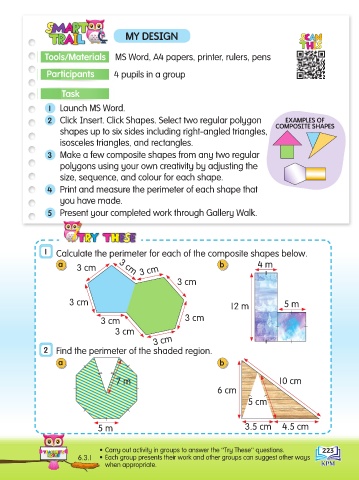
                   1   Calculate the perimeter for each of the composite shapes below.
                       a                                                b          4 m
                             3 cm        3 cm   3 cm
                                                           3 cm


                           3 cm                                                            5 m
                                                                           12 m
                                    3 cm                     3 cm
                                        3 cm
                                                    3 cm
                   2   Find the perimeter of the shaded region.
                       a                                                b


                                         7 m                                              10 cm
                                                                       6 cm
                                                                                5 cm


                                   5 m                                         3.5 cm      4.5 cm


                                    • Carry out activity in groups to answer the ‟Try These” questions.  223
                             6.3.1  • Each group presents their work and other groups can suggest other ways
                                     when appropriate.

