


Page 58 - TCS ICT Book 8
P. 58
The City School  2021-2022


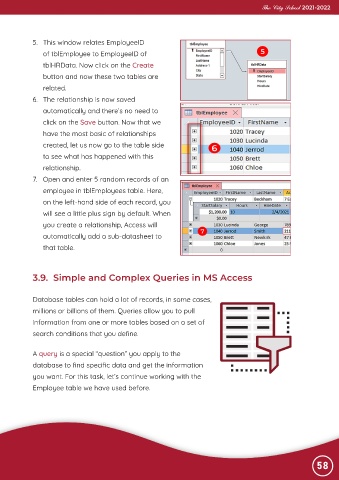
             5.  This window relates EmployeeID

                of tblEmployee to EmployeeID of
                tblHRData. Now click on the Create

                button and now these two tables are
                related.

             6.  The relationship is now saved
                automatically and there’s no need to

                click on the Save button. Now that we
                have the most basic of relationships

                created, let us now go to the table side
                to see what has happened with this

                relationship.
             7.  Open and enter 5 random records of an

                employee in tblEmployees table. Here,
                on the left-hand side of each record, you

                will see a little plus sign by default. When
                you create a relationship, Access will

                automatically add a sub-datasheet to
                that table.


             3.9.  Simple and Complex Queries in MS Access


             Database tables can hold a lot of records, in some cases,

             millions or billions of them. Queries allow you to pull

             information from one or more tables based on a set of
             search conditions that you define.


             A query is a special “question” you apply to the

             database to find specific data and get the information
             you want. For this task, let’s continue working with the

             Employee table we have used before.


                                                                                                                58

