


Page 79 - TCS ICT Book 8
P. 79
The City School  2021-2022


             4.4. Getting Started with Visual Studio


             This chapter focuses on the use of Microsoft Visual Studio IDE (integrated
             development environment), it is used to develop computer programs, as well as

             websites, web apps, web services and mobile apps.                                                      Developing Applications


             Writing Your First Program in VS


             Let’s start by creating windows form program using visual studio IDE:


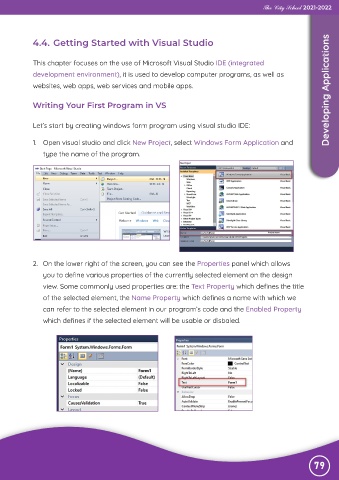
             1.  Open visual studio and click New Project, select Windows Form Application and

                type the name of the program.


             2.  On the lower right of the screen, you can see the Properties panel which allows
                you to define various properties of the currently selected element on the design

                view. Some commonly used properties are: the Text Property which defines the title
                of the selected element, the Name Property which defines a name with which we

                can refer to the selected element in our program’s code and the Enabled Property
                which defines if the selected element will be usable or disbaled.


                                                                                                               79

