


Page 84 - TCS ICT Book 8
P. 84
The City School  2021-2022


             Declaring a Private Variable


             It is used to accept textual input from the user. The user can add strings, numerical

             values and a combination of those.

             In visual studio, we can declare the variable by the keyword Dim which is a short form

             for dimension. For better understanding, we will create a program using 2 variables
             and calculate them to see its working. Follow these steps to create a program with

             variables in it:


             1.  Create a new form and name that form as
                Variables.

             2.  Add 2 text fields from the toolbox in the
                form.

             3.  Add 1 button from the toolbox in the form
                and change the text property of the button

                to Add from properties panel.
             4.  Add 1 label from the toolbox in the form

                and change the text property of the label to
                Result from the properties panel

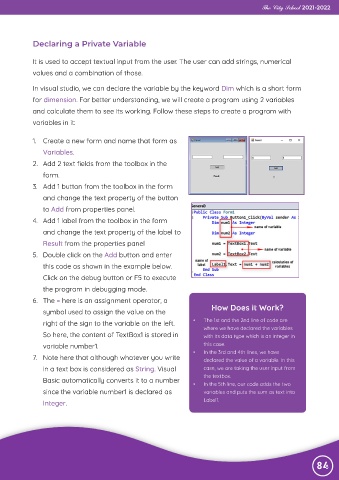
             5.  Double click on the Add button and enter
                this code as shown in the example below.

                Click on the debug button or F5 to execute
                the program in debugging mode.

             6.  The = here is an assignment operator, a
                symbol used to assign the value on the                     How Does it Work?

                right of the sign to the variable on the left.       •   The 1st and the 2nd line of code are
                                                                         where we have declared the variables
                So here, the content of TextBox1 is stored in            with its data type which is an integer in

                variable number1.                                        this case.
                                                                     •   In the 3rd and 4th lines, we have
             7.  Note here that although whatever you write              declared the value of a variable. In this

                in a text box is considered as String. Visual            case, we are taking the user input from
                                                                         the textbox.
                Basic automatically converts it to a number
                                                                     •   In the 5th line, our code adds the two
                since the variable number1 is declared as                variables and puts the sum as text into
                Integer.                                                 Label1.


                                                                                                                84

