


Page 32 - TCS ICT Book 4
P. 32
The City School  2021-2022


           3.  To change the layout of an existing slide, right click the slide and select Layout from the
              menu and choose the desired layout.


           Using Slide Themes

           A theme is a predefined combination of colours, fonts, and

           effects. Different themes also use different slide layouts.

           You can choose from a variety of new themes at any time,
           giving your entire presentation a consistent, professional
           look. Themes can be applied or changed at any time.

           Here is the procedure to apply a theme on slide or

           presentation:

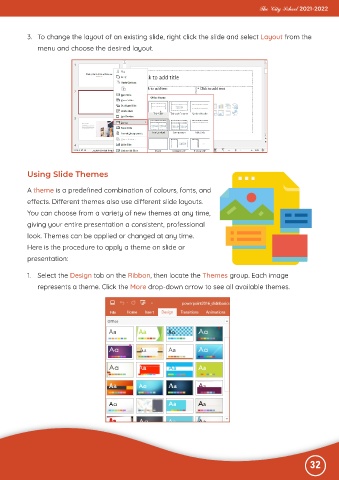
           1.  Select the Design tab on the Ribbon, then locate the Themes group. Each image

              represents a theme. Click the More drop-down arrow to see all available themes.


                                                                                                              32

