


Page 13 - TCS ICT Book 7
P. 13
The City School  2021-2022


            Relative Reference


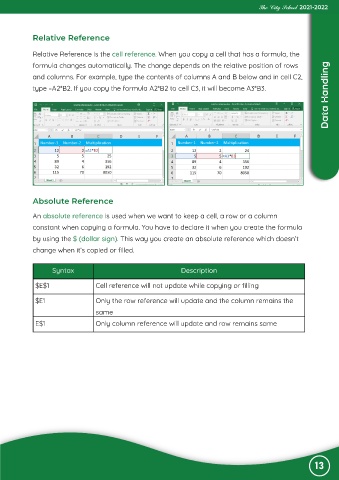
            Relative Reference is the cell reference. When you copy a cell that has a formula, the
            formula changes automatically. The change depends on the relative position of rows
                                                                                                                    Data Handling
            and columns. For example, type the contents of columns A and B below and in cell C2,
            type =A2*B2. If you copy the formula A2*B2 to cell C3, it will become A3*B3.


             Absolute Reference

             An absolute reference is used when we want to keep a cell, a row or a column

             constant when copying a formula. You have to declare it when you create the formula
             by using the $ (dollar sign). This way you create an absolute reference which doesn’t

             change when it’s copied or filled.


                   Syntax                                        Description

             $E$1                  Cell reference will not update while copying or filling


             $E1                   Only the row reference will update and the column remains the
                                   same

             E$1                   Only column reference will update and row remains same


                                                                                                                13

