


Page 142 - Learn To Program With Scratch
P. 142
Summary
                         Variables are one of the most important concepts in programming. A vari-
                         able is the name of an area in computer memory where we can store a
                         single value, such as a number or a string.
                             In this chapter, you learned the basic data types supported in Scratch
                         and the operations permitted on these types. You then learned how to cre-
                         ate variables and use them to store a piece of data.
                             You also implemented several practical applications that used variables
                         to demonstrate different features. You explored variables’ monitors and
                         used them to create different kinds of interactive programs. Finally, you
                         learned how to use the ask and wait block to prompt the user for some
                         input and process the user’s responses in your program.
                             In the next chapter, you'll learn more about the Boolean data type and
                         the fundamental role it plays in decision making. You’ll also learn about the
                         if and the if/else blocks and use them to add another level of intelligence
                         to your Scratch programs. So roll up your sleeves and get ready for another
                         exciting chapter!

              Problems

                         1.  Create a script that implements the following instructions:
                             •   Set the speed variable to 60 (mph).
                             •   Set the time variable to 2.5 (hours).
                             •   Calculate the distance traveled and save the answer in the distance
                                variable.
                             •   Display the calculated distance, with an appropriate message, to
                                the user
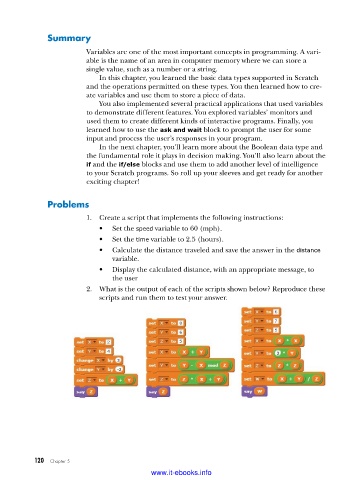
                         2.  What is the output of each of the scripts shown below? Reproduce these
                             scripts and run them to test your answer.


           120   Chapter 5
                                           www.it-ebooks.info

