


Page 137 - Learn To Program With Scratch
P. 137
rose. When the user clicks that button, the button sprite simply broadcasts
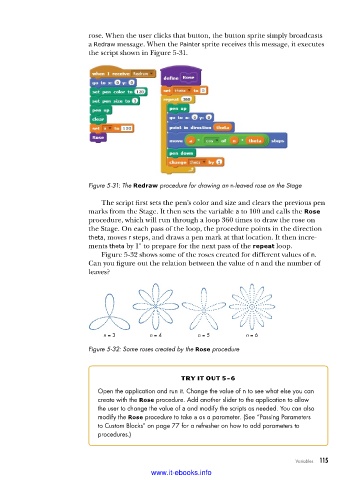
                          a Redraw message. When the Painter sprite receives this message, it executes
                          the script shown in Figure 5-31.


                          Figure 5-31: The Redraw procedure for drawing an n-leaved rose on the Stage

                             The script first sets the pen’s color and size and clears the previous pen
                          marks from the Stage. It then sets the variable a to 100 and calls the Rose
                          procedure, which will run through a loop 360 times to draw the rose on
                          the Stage. On each pass of the loop, the procedure points in the direction
                          theta, moves r steps, and draws a pen mark at that location. It then incre-
                          ments theta by 1° to prepare for the next pass of the repeat loop.
                             Figure 5-32 shows some of the roses created for different values of n.
                          Can you figure out the relation between the value of n and the number of
                          leaves?


                              n = 3        n = 4        n = 5        n = 6
                          Figure 5-32: Some roses created by the Rose procedure


                                                   try it out 5-6
                            Open the application and run it . Change the value of n to see what else you can
                            create with the Rose procedure . Add another slider to the application to allow
                            the user to change the value of a and modify the scripts as needed . You can also
                            modify the Rose procedure to take a as a parameter . (See “Passing Parameters
                            to Custom Blocks” on page 77 for a refresher on how to add parameters to
                            procedures .)


                                                                                   Variables   115

                                           www.it-ebooks.info

