


Page 139 - Learn To Program With Scratch
P. 139
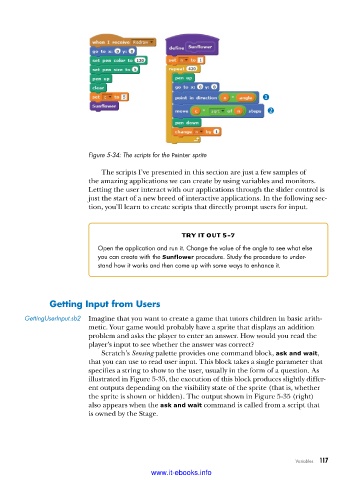
Figure 5-34: The scripts for the Painter sprite
The scripts I’ve presented in this section are just a few samples of
the amazing applications we can create by using variables and monitors.
Letting the user interact with our applications through the slider control is
just the start of a new breed of interactive applications. In the following sec-
tion, you’ll learn to create scripts that directly prompt users for input.
try it out 5-7
Open the application and run it . Change the value of the angle to see what else
you can create with the Sunflower procedure . Study the procedure to under-
stand how it works and then come up with some ways to enhance it .
getting input from users
GettingUserInput .sb2 Imagine that you want to create a game that tutors children in basic arith-
metic. Your game would probably have a sprite that displays an addition
problem and asks the player to enter an answer. How would you read the
player’s input to see whether the answer was correct?
Scratch’s Sensing palette provides one command block, ask and wait,
that you can use to read user input. This block takes a single parameter that
specifies a string to show to the user, usually in the form of a question. As
illustrated in Figure 5-35, the execution of this block produces slightly differ-
ent outputs depending on the visibility state of the sprite (that is, whether
the sprite is shown or hidden). The output shown in Figure 5-35 (right)
also appears when the ask and wait command is called from a script that
is owned by the Stage.
Variables 117
www.it-ebooks.info

