


Page 244 - Learn To Program With Scratch
P. 244
of the vertical bars would have rounded tips. The numerical values for
the five bars are shown using five variables, named n1 through n5, whose
monitors are located at the right positions on the Stage. When you click
the green flag icon to start the application, the Driver sprite runs the script
shown in Figure 9-13.
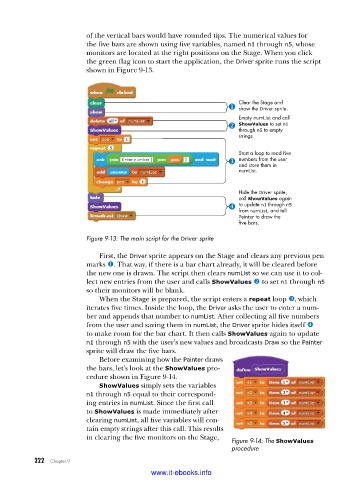
Clear the Stage and
show the Driver sprite.
Empty numList and call
ShowValues to set n1
through n5 to empty
strings.
Start a loop to read five
numbers from the user
and store them in
numList.
Hide the Driver sprite,
call ShowValues again
to update n1 through n5
from numList, and tell
Painter to draw the
five bars.
Figure 9-13: The main script for the Driver sprite
First, the Driver sprite appears on the Stage and clears any previous pen
marks u. That way, if there is a bar chart already, it will be cleared before
the new one is drawn. The script then clears numList so we can use it to col-
lect new entries from the user and calls ShowValues v to set n1 through n5
so their monitors will be blank.
When the Stage is prepared, the script enters a repeat loop w, which
iterates five times. Inside the loop, the Driver asks the user to enter a num-
ber and appends that number to numList. After collecting all five numbers
from the user and saving them in numList, the Driver sprite hides itself x
to make room for the bar chart. It then calls ShowValues again to update
n1 through n5 with the user’s new values and broadcasts Draw so the Painter
sprite will draw the five bars.
Before examining how the Painter draws
the bars, let’s look at the ShowValues pro-
cedure shown in Figure 9-14.
ShowValues simply sets the variables
n1 through n5 equal to their correspond-
ing entries in numList. Since the first call
to ShowValues is made immediately after
clearing numList, all five variables will con-
tain empty strings after this call. This results
in clearing the five monitors on the Stage, Figure 9-14: The ShowValues
procedure
222 Chapter 9
www.it-ebooks.info

