


Page 110 - Super Scratch Programming Adventure -2nd Edition
P. 110
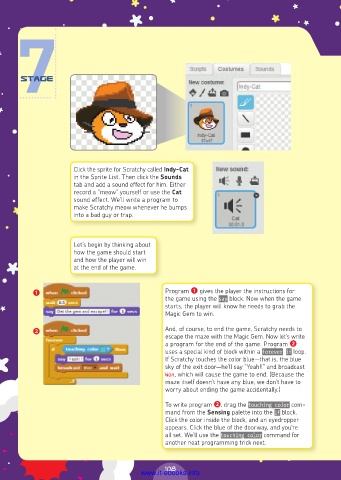
Click the sprite for Scratchy called Indy-Cat
                      in the Sprite List. Then click the Sounds
                      tab and add a sound effect for him. Either
                      record a “meow” yourself or use the Cat
                      sound effect. We’ll write a program to
                      make Scratchy meow whenever he bumps
                      into a bad guy or trap.


                      Let’s begin by thinking about
                      how the game should start
                      and how the player will win
                      at the end of the game.


          ❶                                     Program ❶ gives the player the instructions for
                                                the game using the say block. Now when the game
                                                starts, the player will know he needs to grab the
                                                Magic Gem to win.

          ❷                                     And, of course, to end the game, Scratchy needs to
                                                escape the maze with the Magic Gem. Now let’s write
                                                a program for the end of the game. Program ❷
                                                uses a special kind of block within a forever if loop.
                                                If Scratchy touches the color blue—that is, the blue
                                                sky of the exit door—he’ll say “Yeah!!” and broadcast
                                                Won, which will cause the game to end. (Because the
                                                maze itself doesn’t have any blue, we don’t have to
                                                worry about ending the game accidentally.)
                                                To write program ❷, drag the touching color com-
                                                mand from the Sensing palette into the if block.
                                                Click the color inside the block, and an eyedropper
                                                appears. Click the blue of the doorway, and you’re
                                                all set. We’ll use the touching color command for
                                                another neat programming trick next.


                                                108
                                         www.it-ebooks.info

