


Page 111 - Super Scratch Programming Adventure -2nd Edition
P. 111
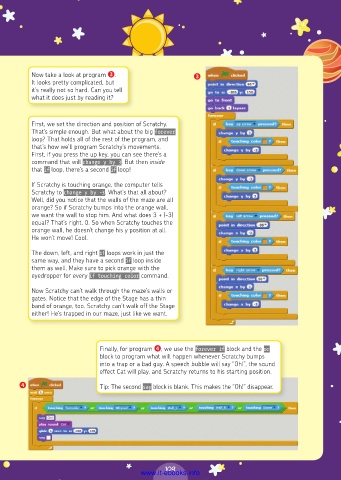
Now take a look at program ❸.                 ❸
          It looks pretty complicated, but
          it’s really not so hard. Can you tell
          what it does just by reading it?


          First, we set the direction and position of Scratchy.
          That’s simple enough. But what about the big forever
          loop? That holds all of the rest of the program, and
          that’s how we’ll program Scratchy’s movements.
          First, if you press the up key, you can see there’s a
          command that will change y by 3. But then inside
          that if loop, there’s a second if loop!
          If Scratchy is touching orange, the computer tells
          Scratchy to change y by -3. What’s that all about?
          Well, did you notice that the walls of the maze are all
          orange? So if Scratchy bumps into the orange wall,
          we want the wall to stop him. And what does 3 + (-3)
          equal? That’s right, 0. So when Scratchy touches the
          orange wall, he doesn’t change his y position at all.
          He won’t move! Cool.
          The down, left, and right if loops work in just the
          same way, and they have a second if loop inside
          them as well. Make sure to pick orange with the
          eyedropper for every if touching color command.

          Now Scratchy can’t walk through the maze’s walls or
          gates. Notice that the edge of the Stage has a thin
          band of orange, too. Scratchy can’t walk off the Stage
          either! He’s trapped in our maze, just like we want.


                             Finally, for program ❹, we use the forever if block and the or
                             block to program what will happen whenever Scratchy bumps
                             into a trap or a bad guy. A speech bubble will say “Oh!”, the sound
                             effect Cat will play, and Scratchy returns to his starting position.

       ❹                     Tip: The second say block is blank. This makes the “Oh!” disappear.


                                                109
                                         www.it-ebooks.info

