


Page 114 - Super Scratch Programming Adventure -2nd Edition
P. 114
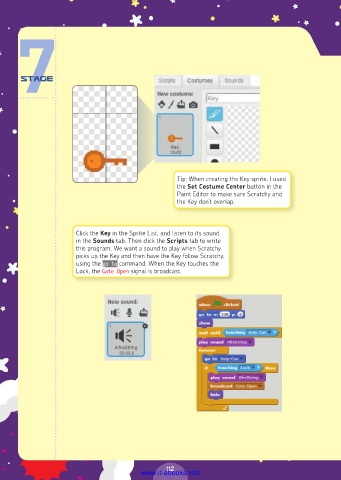
Tip: When creating the Key sprite, I used
                                                   the Set Costume Center button in the
                                                   Paint Editor to make sure Scratchy and
                                                   the Key don’t overlap.


                       Click the Key in the Sprite List, and listen to its sound
                       in the Sounds tab. Then click the Scripts tab to write
                       this program. We want a sound to play when Scratchy
                       picks up the Key and then have the Key follow Scratchy,
                       using the go to command. When the Key touches the
                       Lock, the Gate Open signal is broadcast.


                                                112
                                         www.it-ebooks.info

