


Page 37 - Super Scratch Programming Adventure -2nd Edition
P. 37
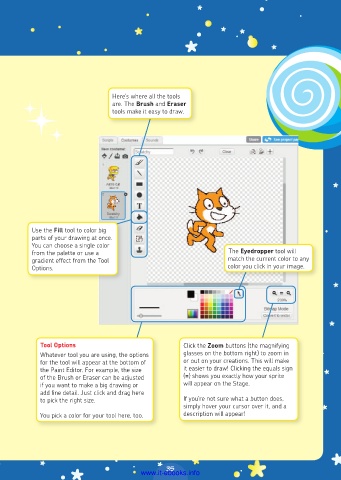
Here’s where all the tools
                                 are. The Brush and Eraser
                                 tools make it easy to draw.


          Use the Fill tool to color big
          parts of your drawing at once.
          You can choose a single color
          from the palette or use a                               The Eyedropper tool will
          gradient effect from the Tool                           match the current color to any
          Options.                                                color you click in your image.


            Tool Options                             Click the Zoom buttons (the magnifying
            Whatever tool you are using, the options   glasses on the bottom right) to zoom in
            for the tool will appear at the bottom of   or out on your creations. This will make
            the Paint Editor. For example, the size   it easier to draw! Clicking the equals sign
            of the Brush or Eraser can be adjusted   (=) shows you exactly how your sprite
            if you want to make a big drawing or     will appear on the Stage.
            add fine detail. Just click and drag here
            to pick the right size.                  If you’re not sure what a button does,
                                                     simply hover your cursor over it, and a
            You pick a color for your tool here, too.   description will appear!


                                                35
                                         www.it-ebooks.info

