


Page 40 - Super Scratch Programming Adventure -2nd Edition
P. 40
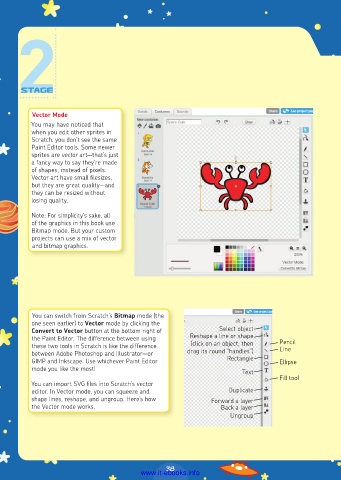
Vector Mode
          You may have noticed that
          when you edit other sprites in
          Scratch, you don’t see the same
          Paint Editor tools. Some newer
          sprites are vector art—that’s just
          a fancy way to say they’re made
          of shapes, instead of pixels.
          Vector art have small filesizes,
          but they are great quality—and
          they can be resized without
          losing quality.

          Note: For simplicity’s sake, all
          of the graphics in this book use
          Bitmap mode. But your custom
          projects can use a mix of vector
          and bitmap graphics.


          You can switch from Scratch’s Bitmap mode (the
          one seen earlier) to Vector mode by clicking the
          Convert to Vector button at the bottom right of       Select object
          the Paint Editor. The difference between using   Reshape a line or shape     Pencil
          these two tools in Scratch is like the difference   (click on an object, then   Line
          between Adobe Photoshop and Illustrator—or   drag its round “handles”)
          GIMP and Inkscape. Use whichever Paint Editor           Rectangle      Ellipse
          mode you like the most!
                                                                      Text
                                                                                 Fill tool
          You can import SVG files into Scratch’s vector
          editor. In Vector mode, you can squeeze and             Duplicate
          shape lines, reshape, and ungroup. Here’s how      Forward a layer
          the Vector mode works.                                Back a layer
                                                                   Ungroup


                                                38
                                         www.it-ebooks.info

