


Page 68 - Super Scratch Programming Adventure -1st Edition
P. 68
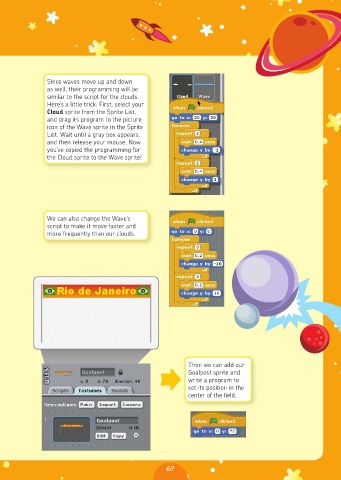
Since waves move up and down
              as well, their programming will be
              similar to the script for the clouds.
              Here’s a little trick: First, select your
              Cloud sprite from the Sprite List,
              and drag its program to the picture
              icon of the Wave sprite in the Sprite
              List. Wait until a gray box appears,
              and then release your mouse. Now
              you’ve copied the programming for
              the Cloud sprite to the Wave sprite!


              We can also change the Wave’s
              script to make it move faster and
              more frequently than our clouds.


                                                       Then we can add our
                                                       Goalpost sprite and
                                                       write a program to
                                                       set its position in the
                                                       center of the field.


                                                67

