


Page 70 - Super Scratch Programming Adventure -1st Edition
P. 70
❶


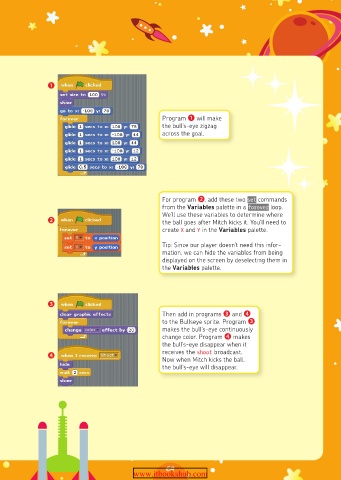
                                               Program ❶ will make
                                               the bull’s-eye zigzag
                                               across the goal.


                                               For program ❷, add these two set commands
                                               from the Variables palette in a forever loop.
                                               We’ll use these variables to determine where
               ❷                               the ball goes after Mitch kicks it. You’ll need to
                                               create X and Y in the Variables palette.

                                               Tip: Since our player doesn’t need this infor-
                                               mation, we can hide the variables from being
                                               displayed on the screen by deselecting them in
                                               the Variables palette.


               ❸
                                               Then add in programs ❸ and ❹
                                               to the Bullseye sprite. Program ❸
                                               makes the bull’s-eye continuously
                                               change color. Program ❹ makes
                                               the bull’s-eye disappear when it
               ❹                               receives the shoot broadcast.
                                               Now when Mitch kicks the ball,
                                               the bull’s-eye will disappear.


                                                69
                                       www.itbookshub.com

