


Page 72 - Super Scratch Programming Adventure -1st Edition
P. 72
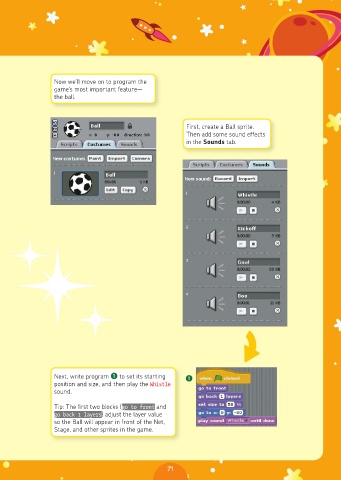
Now we’ll move on to program the
                game’s most important feature—
                the ball.


                                                      First, create a Ball sprite.
                                                      Then add some sound effects
                                                      in the Sounds tab.


                Next, write program ❶ to set its starting   ❶
                position and size, and then play the Whistle
                sound.

                Tip: The first two blocks (go to front and
                go back 1 layers) adjust the layer value
                so the Ball will appear in front of the Net,
                Stage, and other sprites in the game.


                                                 71

