


Page 106 - Scratch Programming Playground
P. 106
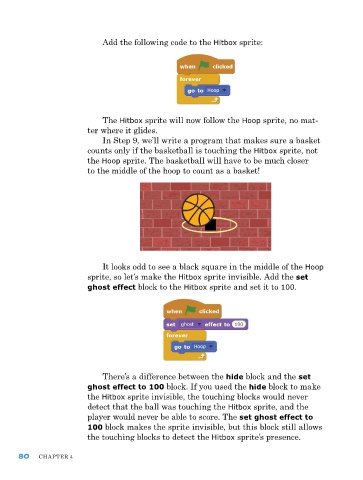
add the following code to the Hitbox sprite:


                             The Hitbox sprite will now follow the Hoop sprite, no mat-
                         ter where it glides.
                              In Step 9, we’ll write a program that makes sure a basket
                         counts only if the basketball is touching the Hitbox sprite, not
                         the Hoop sprite. The basketball will have to be much closer
                         to the middle of the hoop to count as a basket!


                             It looks odd to see a black square in the middle of the Hoop
                         sprite, so let’s make the Hitbox sprite invisible. add the set
                         ghost effect block to the Hitbox sprite and set it to 100.


                              There’s a difference between the hide block and the set
                         ghost effect to 100 block. If you used the hide block to make
                         the Hitbox sprite invisible, the touching blocks would never
                         detect that the ball was touching the Hitbox sprite, and the
                         player would never be able to score. The set ghost effect to
                         100 block makes the sprite invisible, but this block still allows
                         the touching blocks to detect the Hitbox sprite’s presence.


      80    ChapTer 4

