


Page 143 - Scratch Programming Playground
P. 143
effect as they disappear. The if then else block adds some
            variety to the program’s sound effects by randomly selecting
            which sound to play. each time the Tennis Ball sprite touches
            a Brick clone, the program will choose either 1 or 2 at random
            and then play a different sound as a result.
            Add a Sound Effect to the Tennis Ball


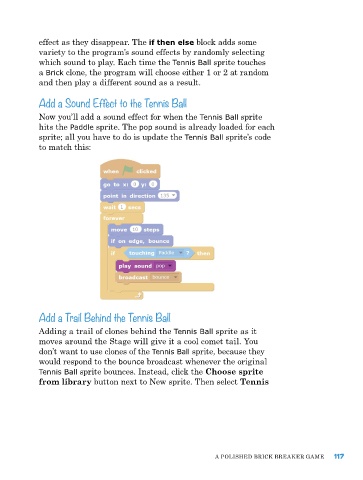
            Now you’ll add a sound effect for when the Tennis Ball sprite
            hits the Paddle sprite. The pop sound is already loaded for each
            sprite; all you have to do is update the Tennis Ball sprite’s code
            to match this:


            Add a Trail Behind the Tennis Ball

            adding a trail of clones behind the Tennis Ball sprite as it
            moves around the Stage will give it a cool comet tail. You
            don’t want to use clones of the Tennis Ball sprite, because they
            would respond to the bounce broadcast whenever the original
            Tennis Ball sprite bounces. Instead, click the Choose sprite
            from library button next to New sprite. Then select Tennis


                                                             a poLIShed BrICk Breaker Game    117

