


Page 145 - Scratch Programming Playground
P. 145
save Point


            Click the green flag to test the code so far. make sure a trail
            of shrinking Tennis Ball2 clones follows the original Tennis Ball
            sprite. Then click the red stop sign and save your program.


            Add an Animated Entrance for the Game Over Sprite

            When the player loses, the GAME OVER text simply appears.
            It would be more exciting if the GAME OVER text had an
            animated entrance like the Brick clones do. modify the Game
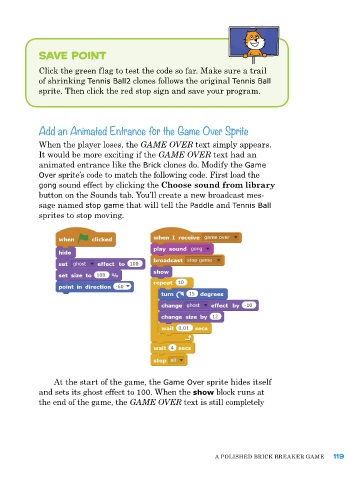
            Over sprite’s code to match the following code. First load the
            gong sound effect by clicking the Choose sound from library
            button on the Sounds tab. You’ll create a new broadcast mes-
            sage named stop game that will tell the Paddle and Tennis Ball
            sprites to stop moving.


                at the start of the game, the Game Over sprite hides itself
            and sets its ghost effect to 100. When the show block runs at
            the end of the game, the GAME OVER text is still completely


                                                             a poLIShed BrICk Breaker Game    119

