


Page 146 - Scratch Programming Playground
P. 146
invisible. The animation code inside the repeat 10 block makes
                         the GAME OVER text slowly fade in by changing the ghost
                         effect by -10. The turn clockwise 15 degrees and change
                         size by 12 blocks rotate and enlarge the text. after a 4 second
                         pause, the stop all block ends the program.
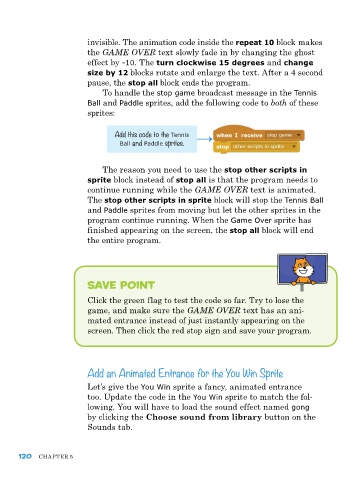
                             To handle the stop game broadcast message in the Tennis
                         Ball and Paddle sprites, add the following code to both of these
                         sprites:


                                 Add this code to the Tennis
                                  Ball and Paddle sprites.


                             The reason you need to use the stop other scripts in
                         sprite block instead of stop all is that the program needs to
                         continue running while the GAME OVER text is animated.
                         The stop other scripts in sprite block will stop the Tennis Ball
                         and Paddle sprites from moving but let the other sprites in the
                         program continue running. When the Game Over sprite has
                         finished appearing on the screen, the stop all block will end
                         the entire program.


                         save Point

                         Click the green flag to test the code so far. Try to lose the
                         game, and make sure the GAME OVER text has an ani-
                         mated entrance instead of just instantly appearing on the
                         screen. Then click the red stop sign and save your program.


                         Add an Animated Entrance for the You Win Sprite

                         Let’s give the You Win sprite a fancy, animated entrance
                         too. Update the code in the You Win sprite to match the fol-
                         lowing. You will have to load the sound effect named gong
                         by clicking the Choose sound from library button on the
                         Sounds tab.


      120   ChapTer 5

