


Page 205 - Scratch Programming Playground
P. 205
Version 2.0: High Score


            Scratch can store variables on its website using cloud variables.
            Scratch’s cloud variables act just like regular variables except
            their value is remembered even after the web browser closes.
            Cloud variables are shared among every Scratcher using a pro-
            gram. You can make a competition for high scores using cloud
            variables for everyone who’s played your game!
                Because cloud variables use a lot of the Scratch website’s
            bandwidth, there are some limitations for using them:

            X X Cloud variables store only numbers, not text.
            X X Cloud variables can’t be used to make chat or multiplayer
                games.
            X X It takes a second or two for the cloud variable’s value to
                update for everyone.
            X X New Scratchers who haven’t used the website much can’t
                use cloud variables.

                the High Score variable shows the highest score a player
            has made. But using a cloud variable, you can make the game
            show the highest score of every player on the Scratch web-
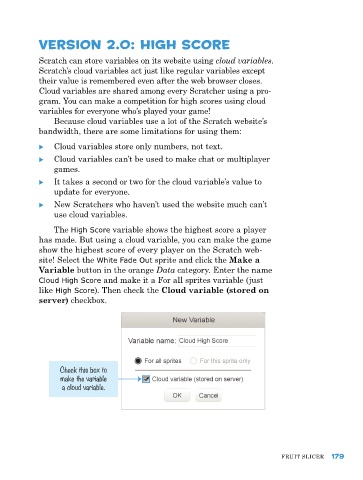
            site! Select the White Fade Out sprite and click the Make a
            Variable button in the orange Data category. enter the name
            Cloud High Score and make it a For all sprites variable (just
            like High Score). then check the Cloud variable (stored on
            server) checkbox.


                  Check this box to
                  make the variable
                  a cloud variable.


                                                                               FruIt SlICer  179

