


Page 216 - Scratch Programming Playground
P. 216
3. Add the Random-Push Code to the Spaceship Sprite


                         The controls for this game offer a challenge, but let’s make
                         playing the game even more difficult. We’ll add random little
                         pushes to the Spaceship sprite so that the player can’t just stay
                         in the center without moving at all.
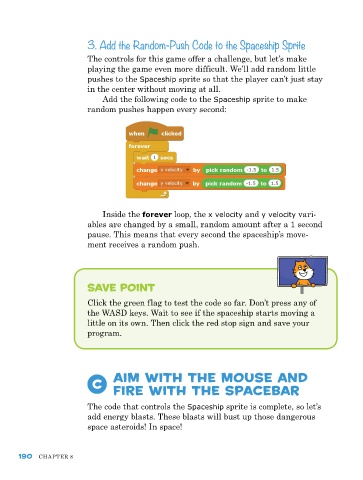
                              Add the following code to the Spaceship sprite to make
                         random pushes happen every second:


                             Inside the forever loop, the x velocity and y velocity vari-
                         ables are changed by a small, random amount after a 1 second
                         pause. This means that every second the spaceship’s move-
                         ment receives a random push.


                         save point

                         Click the green flag to test the code so far. Don’t press any of
                         the WASD keys. Wait to see if the spaceship starts moving a
                         little on its own. Then click the red stop sign and save your
                         program.


                           C     Aim with the Mouse and
                                 Fire with the spacebar


                         The code that controls the Spaceship sprite is complete, so let’s
                         add energy blasts. These blasts will bust up those dangerous
                         space asteroids! In space!


      190   ChApTer 8

