


Page 224 - Scratch Programming Playground
P. 224
hit, the hits variable is 4, and the code deletes the clone instead
                         of creating two new clones. (The code after the delete this
                         clone block doesn’t run, because the clone no longer exists.)
                         This prevents 1 Asteroid sprite from becoming 2, then 4, then
                         8, then 16, then 32, and exponentially more Asteroid sprites
                         forever.
                              however, if you do want exponentially more Asteroid
                         sprites, increase the number in the if hits = 4 then blocks.

                         7. Add the Asteroid Blasted Message Code to
                         the Energy Blast Sprite

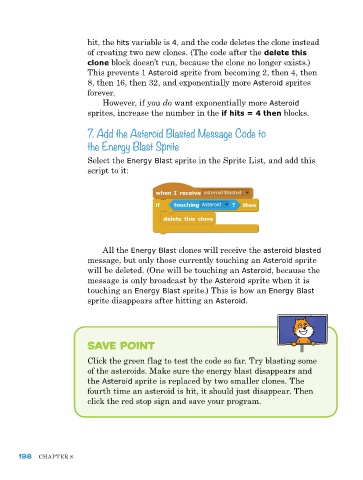
                         Select the Energy Blast sprite in the Sprite List, and add this
                         script to it:


                             All the Energy Blast clones will receive the asteroid blasted
                         message, but only those currently touching an Asteroid sprite
                         will be deleted. (one will be touching an Asteroid, because the
                         message is only broadcast by the Asteroid sprite when it is
                         touching an Energy Blast sprite.) This is how an Energy Blast
                         sprite disappears after hitting an Asteroid.


                         save point

                         Click the green flag to test the code so far. Try blasting some
                         of the asteroids. Make sure the energy blast disappears and
                         the Asteroid sprite is replaced by two smaller clones. The
                         fourth time an asteroid is hit, it should just disappear. Then
                         click the red stop sign and save your program.


      198   ChApTer 8

