


Page 79 - Scratch Programming Playground
P. 79
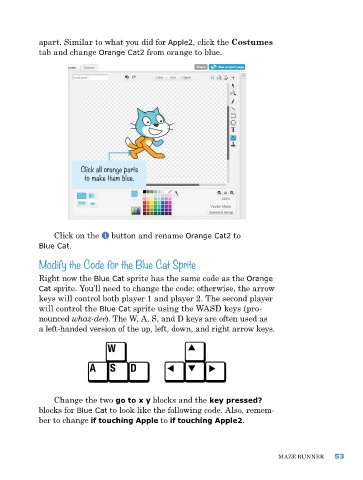
apart. Similar to what you did for Apple2, click the Costumes
            tab and change Orange Cat2 from orange to blue.


                       Click all orange parts
                        to make them blue.


                Click on the   button and rename Orange Cat2 to
            Blue Cat.
            Modify the Code for the Blue Cat Sprite

            right now the Blue Cat sprite has the same code as the Orange
            Cat sprite. You’ll need to change the code; otherwise, the arrow
            keys will control both player 1 and player 2. the second player
            will control the Blue Cat sprite using the WaSD keys (pro-
            nounced whaz-dee). the W, a, S, and D keys are often used as
            a left-handed version of the up, left, down, and right arrow keys.


                Change the two go to x y blocks and the key pressed?
            blocks for Blue Cat to look like the following code. also, remem-
            ber to change if touching Apple to if touching Apple2.


                                                                              Maze runner     53

