


Page 78 - Scratch Programming Playground
P. 78
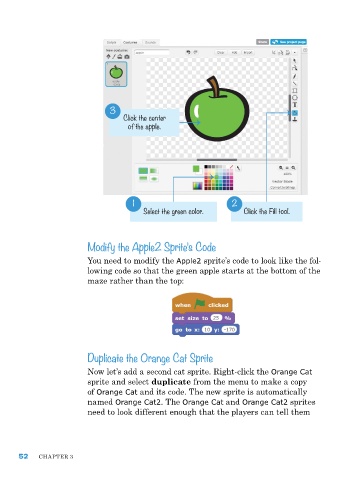
3
                                   Click the center
                                     of the apple.


                                      1                          2
                                         Select the green color.     Click the Fill tool.


                         Modify the Apple2 Sprite’s Code

                         You need to modify the Apple2 sprite’s code to look like the fol-
                         lowing code so that the green apple starts at the bottom of the
                         maze rather than the top:


                         Duplicate the Orange Cat Sprite

                         now let’s add a second cat sprite. right-click the Orange Cat
                         sprite and select duplicate from the menu to make a copy
                         of Orange Cat and its code. the new sprite is automatically
                         named Orange Cat2. the Orange Cat and Orange Cat2 sprites
                         need to look different enough that the players can tell them


      52    Chapter 3

