


Page 131 - Programming With Python 3
P. 131
An Introduction to STEM Programming with Python — 2019-09-03a                              Page 118
            Chapter 10 — Files

            do this: 1) open the file, 2) write the data to the file, and 3) close the file.

             Free
            When opening a file that is stored in the same folder as our Python program, we need just its name. If
            the file is stored in another location on the computer we need to specify the location and name of the
            file, this is called its path. The examples in this chapter will not add the complexity of storing files in
            other locations.

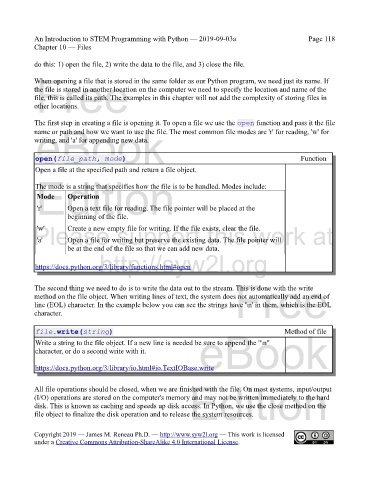
            The first step in creating a file is opening it. To open a file we use the open function and pass it the file
             eBook
            name or path and how we want to use the file. The most common file modes are 'r' for reading, 'w' for
            writing, and 'a' for appending new data.


             open(file_path, mode)                                                                   Function
             Open a file at the specified path and return a file object.
             Edition
             The mode is a string that specifies how the file is to be handled. Modes include:
                       Operation
             Mode
                       Open a text file for reading. The file pointer will be placed at the
             'r'
                       beginning of the file.
            Please support this work at
                       Create a new empty file for writing. If the file exists, clear the file.
             'w'
                       Open a file for writing but preserve the existing data. The file pointer will
             'a'
                       be at the end of the file so that we can add new data.
                                  http://syw2l.org
             https://docs.python.org/3/library/functions.html#open

                                                                               Free
            The second thing we need to do is to write the data out to the stream. This is done with the write
            method on the file object. When writing lines of text, the system does not automatically add an end of
            line (EOL) character. In the example below you can see the strings have '\n' in them, which is the EOL
            character.


             file.write(string)                                                                Method of file
             Write a string to the file object. If a new line is needed be sure to append the "\n"
             character, or do a second write with it.              eBook

             https://docs.python.org/3/library/io.html#io.TextIOBase.write

                                                                Edition
            All file operations should be closed, when we are finished with the file. On most systems, input/output
            (I/O) operations are stored on the computer's memory and may not be written immediately to the hard
            disk. This is known as caching and speeds up disk access. In Python, we use the close method on the
            file object to finalize the disk operation and to release the system resources.


            Copyright 2019 — James M. Reneau Ph.D. — http://www.syw2l.org — This work is licensed
            under a Creative Commons Attribution-ShareAlike 4.0 International License.

