


Page 145 - MuseScore 2.0 handbook
P. 145
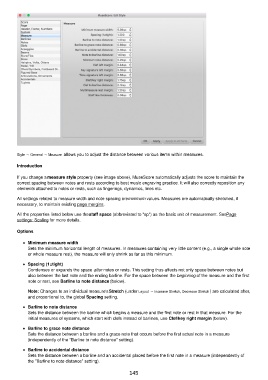
Style → General → Measure allows you to adjust the distance between various items within measures.

         Introduction

         If you change a measure style property (see image above), MuseScore automatically adjusts the score to maintain the
         correct spacing between notes and rests according to best music engraving practice. It will also correctly reposition any
         elements attached to notes or rests, such as fingerings, dynamics, lines etc.
         All settings related to measure width and note spacing are minimum values. Measures are automatically stretched, if
         necessary, to maintain existing page margins.

         All the properties listed below use the staff space (abbreviated to "sp") as the basic unit of measurement. See Page
         settings: Scaling for more details.

         Options

             Minimum measure width
             Sets the minimum horizontal length of measures. In measures containing very little content (e.g., a single whole note
             or whole measure rest), the measure will only shrink as far as this minimum.
             Spacing (1=tight)
             Condenses or expands the space after notes or rests. This setting thus affects not only space between notes but
             also between the last note and the ending barline. For the space between the beginning of the measure and the first
             note or rest, see Barline to note distance (below).

             Note: Changes to an individual measure's Stretch (under Layout → Increase Stretch, Decrease Stretch ) are calculated after,
             and proportional to, the global Spacing setting.
             Barline to note distance
             Sets the distance between the barline which begins a measure and the first note or rest in that measure. For the
             initial measures of systems, which start with clefs instead of barlines, use Clef/key right margin (below).

             Barline to grace note distance
             Sets the distance between a barline and a grace note that occurs before the first actual note in a measure
             (independently of the "Barline to note distance" setting).

             Barline to accidental distance
             Sets the distance between a barline and an accidental placed before the first note in a measure (independently of
             the "Barline to note distance" setting).

                                                          145

