


Page 146 - MuseScore 2.0 handbook
P. 146
Note to barline distance
             (To be added).

             Minimum note distance
             Specifies the smallest amount of space MuseScore will allow after each note (depending on other factors, more
             space may be allowed).

             Clef left margin
             Sets the distance between the very beginning of each line and the clef. (This option is rarely needed.)
             Key signature left margin
             Sets the distance between the key signature and the clef preceding it.

             Time signature left margin
             Sets the distance between the time signature and the key signature or clef preceding it.

             Clef/key right margin
             Sets the distance between the material at the beginning of each line (such as the clef and key signature) and the
             first note or rest of the first measure on the line. (Note that, although not named in the option, if a time signature is
             present, it is the element from which the spacing begins.)
             Clef to barline distance
             Sets the distance between a barline and a clef change preceding it.

             Multi-measure rest margin
             Sets the distance between a multi-measure rest and the barlines on either side.

             Staff line thickness
             Sets the thickness of the lines of the staff, which allows you to make the staff thicker and darker, if you need greater
             visibility on your printouts.

         Pagina-instellingen

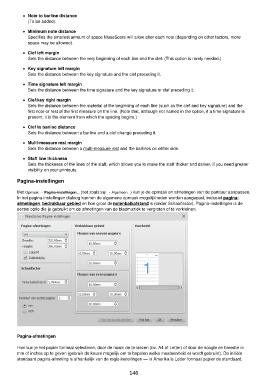
         Met Opmaak → Pagina-instellingen... (net zoals Stijl → Algemeen...) kun je de opmaak en afmetingen van de partituur aanpassen.
         In het pagina-instellingen dialoog kunnen de algemene opmaak mogelijkheden worden aangepast, inclusief pagina-
         afmetingen, bedrukbaar gebied en hoe groot de notenbalkafstand is (onder Schaalfactor). Pagina-instellingen is de
         eerste optie die je gebruikt om de afmetingen van de bladmuziek te vergroten of te verkleinen.


         Pagina-afmetingen


         Hier kun je het papier formaat selecteren, door de naam de te kiezen (bv. A4 of Letter) of door de hoogte en breedte in
         mm of inches op te geven (gebruik de keuze mogelijk om te bepalen welke maateenheid er wordt gebruikt). De initiële
         standaard pagina-afmeting is afhankelijk van de regio instellingen — in Amerika is Letter formaat papier de standaard.

                                                          146

