


Page 15 - MuseScore 2.0 handbook
P. 15
2.  Ga naar de Nonexistant node nid: 27 pagina van de MuseScore website. Klik op de link voor de stabiele Fedora
             download en kies het juiste rpm pakket voor jouw platform.

           3.  Afhankelijk van jouw platform, gebruik één van de volgende twee commando's om MuseScore te installeren

                  voor platform i386

                  su
                  yum localinstall musescore-X.Y-1.fc10.i386.rpm
                  voor platform x86_64

                  su
                  yum localinstall musescore-X.Y-1.fc10.x86_64.rpm

         Als je problemen hebt met het geluid, zie dan Fedora 11 en geluid

         Zie ook

             Hoe kan ik de taal van MuseScore aanpassen
             Hoe kan ik MuseScore installeren zonder administrator rechten
             Hoe kan ik MuseScore uitvoeren als Administrator in Windows

         Install on Windows


         Install

         You can get the Windows installer from the download   page of the MuseScore website. Click on the link to start the
         download. Your Internet browser will ask you to confirm that you want to download this file. Click Save File.

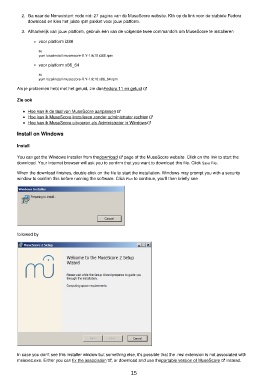
         When the download finishes, double-click on the file to start the installation. Windows may prompt you with a security
         window to confirm this before running the software. Click Run to continue, you'll then briefly see


         followed by


         In case you don't see this installer window but something else, it's possible that the .msi extension is not associated with
         msiexec.exe. Either you can fix the association  , or download and use the portable version of MuseScore   instead.

                                                           15

