


Page 20 - MuseScore 2.0 handbook
P. 20
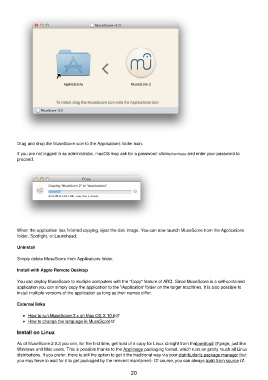
Drag and drop the MuseScore icon to the Applications folder icon.

         If you are not logged in as administrator, macOS may ask for a password: click Authenticate and enter your password to
         proceed.


         When the application has finished copying, eject the disk image. You can now launch MuseScore from the Applications
         folder, Spotlight, or Launchpad.

         Uninstall

         Simply delete MuseScore from Applications folder.

         Install with Apple Remote Desktop

         You can deploy MuseScore to multiple computers with the "Copy" feature of ARD. Since MuseScore is a self-contained
         application you can simply copy the application to the '/Application' folder on the target machines. It is also possible to
         install multiple versions of the application as long as their names differ.


         External links

             How to run MuseScore 2.x on Mac OS X 10.6
             How to change the language in MuseScore

         Install on Linux

         As of MuseScore 2.0.3 you can, for the first time, get hold of a copy for Linux straight from the download   page, just like
         Windows and Mac users. This is possible thanks to the AppImage packaging format, which runs on pretty much all Linux
         distributions. If you prefer, there is still the option to get it the traditional way via your distribution's package manager (but
         you may have to wait for it to get packaged by the relevant maintainer). Of course, you can always build from source  .

                                                           20

