


Page 3 - CH-1-(sample)
P. 3
Fastrack - 10


            Connection Type                                          Description
                                      DSL stands for Digital Subscribers’ Line and is always connected to the
           2.  DSL (Digital
                                      Internet,  so  you  do  not  have  to  dial  up  to  connect.  It  is  considered  to  be
              Subscribers’ Line)
                                      broadband Internet, which means that it has a high speed.
           3.  Cable Internet         Cable Internet connections are possible through Cable TV lines. The Cable
              Connection              Internet connection uses TV channels for data transmission.
                                      Wireless Internet is one of the newest types of Internet connections. It uses
           4.  Wireless Internet
                                      radio frequencies to connect to the Internet. Examples of wireless Internet
              Connection
                                      connection are WiFi and WiMax.
           5.  Satellite Internet     Internet over Satellite (IoS) uses the communication satellites stationed in
              Service                 space to connect to the Internet.


                                                                                      Do You Know
           ISDN which stands for Integrated Services Digital Network, is also a type of Internet connection
           which could not become popular among users due to certain limitations.

          THINGS REQUIRED TO CONNECT TO THE INTERNET
          To connect to the Internet, your computer requires a modem, a Web browser and a connection to an
          ISP. Let us first learn more about these basic requirements of connecting to the Internet.
          Internet Service Provider (ISP)

          An Internet Service Provider (ISP), also sometimes referred to as Internet Access Provider (IAP),
          is a company that provides its customers access to the Internet. The ISP connects to its customers using any
          one of a data transmission technology such as dial-up, DSL, cable modem, wireless or dedicated high-speed
          connections. Some of the Internet Service Providers of India are:


                                                                                           Remember

           ADSL (Asymmetric DSL) is a type of DSL that provides high speed downloaded speeds up as
           significantly lower speed to upload data on the Internet. This type of service is most suitable for
           houses and places where most of the times information is download.

          Modem
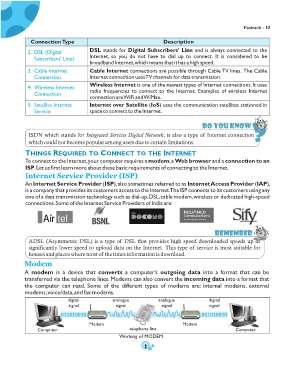
          A  modem  is  a  device  that  converts  a  computer’s  outgoing  data  into  a  format  that  can  be
          transferred via the telephone lines. Modems can also convert the incoming data into a format that
          the  computer  can  read.  Some  of  the  different  types  of  modems  are:  internal  modems,  external
          modems, voice/data, and fax modems.

                            digital            analogue            analogue             digital
                             signal              signal             signal               signal
                         011010010                                                   011010010

                                     Modem                                   Modem
               Computer                                telephone line                               Computer
                                                  Working of MODEM

                                                             2

