


Page 50 - Xamarin Android Application Development
P. 50
Dialogs and Toast                                                                           46


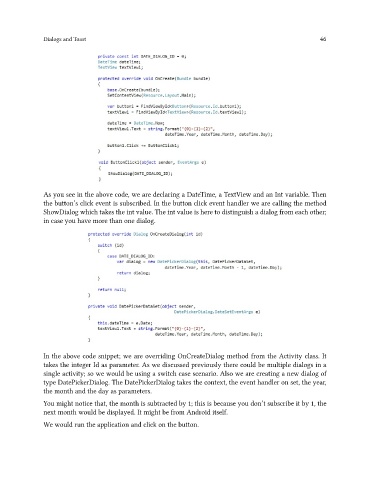
               As you see in the above code, we are declaring a DateTime, a TextView and an Int variable. Then
               the button’s click event is subscribed. In the button click event handler we are calling the method
               ShowDialog which takes the int value. The int value is here to distinguish a dialog from each other;
               in case you have more than one dialog.


               In the above code snippet; we are overriding OnCreateDialog method from the Activity class. It
               takes the integer Id as parameter. As we discussed previously there could be multiple dialogs in a
               single activity; so we would be using a switch case scenario. Also we are creating a new dialog of
               type DatePickerDialog. The DatePickerDialog takes the context, the event handler on set, the year,
               the month and the day as parameters.
               You might notice that, the month is subtracted by 1; this is because you don’t subscribe it by 1, the
               next month would be displayed. It might be from Android itself.

               We would run the application and click on the button.

