


Page 233 - Basic Course
P. 233
KNX BASIC COURSE

                  including those that are more or less “hidden” in a KNX ETS database. The contractor or
                  the project designer of a KNX project should therefore be prepared to produce the
                  underneath listed data and documents and issue them to the client in an appropriate and
                  usable format.


                  14.1.1  Contents of the project documentation

                      Database: It seems at first the easiest way is to copy the ETS database of the project
                      onto a CD or USB stick and then hand it over to the customer. This is possible in
                      principle but only in the BACKUP format! The database that is being edited consists of
                      several components as well as PC-dependent data, so it would be completely
                      pointless to copy this data.
                      The customer cannot however do anything with it without an appropriate ETS
                      program. In other words, he must have an appropriate ETS license! Moreover, there
                      may be a need for supplementary data, e.g. DLLs and help files or supplementary files
                      of individual products, which may be indispensable if one wishes to change the
                      products at a later date. Since ETS 3 and according to the manufacturers, all data
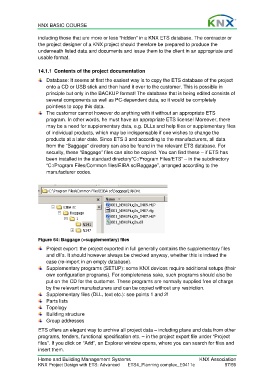
                      from the “Baggage” directory can also be found in the relevant ETS database. For
                      security, these “Baggage” files can also be copied. You can find these – if ETS has
                      been installed in the standard directory”C:/Program Files/ETS” – in the subdirectory
                      “C:/Program Files/Common files/EIBA sc/Baggage”, arranged according to the
                      manufacturer codes.


                  Figure 64: Baggage (=supplementary) files
                      Project export: the project exported in full generally contains the supplementary files
                      and dll’s. It should however always be checked anyway, whether this is indeed the
                      case (re-import in an empty database).
                      Supplementary programs (SETUP): some KNX devices require additional setups (their
                      own configuration programs). For completeness sake, such programs should also be
                      put on the CD for the customer. These programs are normally supplied free of charge
                      by the relevant manufacturers and can be copied without any restriction.
                      Supplementary files (DLL, text etc.): see points 1 and 2!
                      Parts lists
                     Topology
                     Building structure
                     Group addresses

                  ETS offers an elegant way to archive all project data – including plans and data from other
                  programs, tenders, functional specification etc. – in the project export file under “Project
                  files”. If you click on “Add”, an Explorer window opens, where you can search for files and
                  insert them.

                  Home and Building Management Systems                                    KNX Association
                  KNX Project Design with ETS: Advanced   ETS4_Planning complex_E0411c               57/59

