


Page 230 - Basic Course
P. 230
KNX BASIC COURSE

                  The best procedure is
                      defining per project which products should be used
                      importing these products into a project-specific ETS4 database
                      in this way you kill two birds with one stone: you produce a small, slimline database
                      that is quick to edit, while also restricting any possible losses to one single project.


                  13.3 Creating regular backups


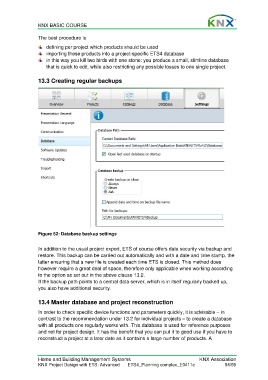
                  Figure 62: Database backup settings

                  In addition to the usual project export, ETS of course offers data security via backup and
                  restore. This backup can be carried out automatically and with a date and time stamp, the
                  latter ensuring that a new file is created each time ETS is closed. This method does
                  however require a great deal of space, therefore only applicable when working according
                  to the option as set out in the above clause 13.2.
                  If the backup path points to a central data server, which is in itself regularly backed up,
                  you also have additional security.


                  13.4 Master database and project reconstruction

                  In order to check specific device functions and parameters quickly, it is advisable – in
                  contrast to the recommendation under 13.2 for individual projects – to create a database
                  with all products one regularly works with. This database is used for reference purposes
                  and not for project design. It has the benefit that you can put it to good use if you have to
                  reconstruct a project at a later date as it contains a large number of products. A


                  Home and Building Management Systems                                    KNX Association
                  KNX Project Design with ETS: Advanced   ETS4_Planning complex_E0411c               54/59

